Today I want to share three excellent guides for keeping your self and your community safe. I love how they use clear language and understandable images to convey information. I’ve had these tabs open in my browser for months so I figured I should post there here so I’ll always know where to find them.
My absolute favorite is this zine by the Climate Defense Project that uses elephants to teach about security culture. Developing a culture of good safety practices is one of the most important things any organization or group can do. More than rules about which tools to use and how, this enables people to make good choices and be aware of how their actions impact others who may be more vulnerable.
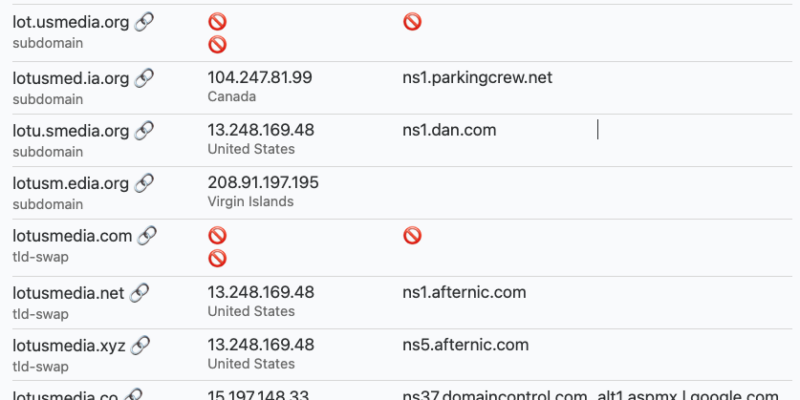
I recently participated in NTEN‘s new cybersecurity community, and learned about this wonderful easy tool called DNStwist. All you have to do is enter your own domain name (eg: lotusmedia.org in my case) and it scans global domain registries for common variations designed to trick a reader into thinking it’s your domain.
A very common phishing technique is to send an e-mail seeming to be from your organization that sends people to what seems like your website. Both the e-mail address and URL might look almost exactly like yours, especially to someone who is not paying attention. Often scammers will add an element of urgency which adds to the user’s confusion and lead them to take action before thinking it through clearly.
After running this scan which shows 15 domains spoofing mine, my next step as an organization would be to block all of these addresses from e-mailing anyone in my workspace. Unfortunately I don’t have any way to stop an external internet user from visiting and mistaking one of these sites for mine. So be alert and make sure you always know who is behind what you’re looking at!
I don’t know about you, but the past year has been a real wake up call for me about the importance of digital security. I used to think of hackers as bored teenagers showing off for their friends, or scammers sending viruses and spam to people by the millions. But today’s online outlaws are much more sophisticated.
Not content to just blast misleading links at us, elite hackers have started spear phishing. This is a tactic that sends an e-mail to an individual with unique, personalized information making it look very real, and convincing the user to click through to a website where they will enter their login credentials. Some hackers also use social engineering (not technology) to trick people into giving away critical information that can then be leveraged to compromise accounts.
Unfortunately, we need to worry not only about obviously sensitive information like bank accounts and e-mails, even seemingly inconsequential accounts can be exploited to provide an opening. Once a hacker gets into any of your accounts, be it iTunes, Etsy, or Pinterest, they can use that information to access other services.
The threat to our privacy is real, and we have seen that there are people who may target us and access our data not just for commercial purposes but for political use. People and organizations that are working for social change have every reason to be concerned about how our personal information, organizational data, and private communications might be used.
Good security is a pain to implement, but every inconvenience for us is an even bigger hassle for a would-be hacker. Start now from wherever you are, and make incremental changes to improve your personal and organizational security.
OK, Ruby, we’re terrified! What do we do?
There is always room for improvement of our security practices, especially as we learn more about the threats that are out there. Here are my recommendations for where to start.
Use randomized, unique passwords on every single site, and use a solid password manager like LastPass or 1Password to store them. Both have group options for setting up a whole team and sharing between them. Never send a password over e-mail or social media.
Use multifactor (a.k.a. “two-step”) authentication for your e-mail, social media accounts, and any other service that offers it. Individual Gmail users can start here. If your organization uses Google services, you can require this for all users.
Protect your website with HTTPS, especially if users are entering e-mail addresses and passwords. And use HTTPS Everywhere in your own browser to make your web traffic private.
Secure your laptop and phone by setting them to require a password every time they start or wake up. Bonus: encrypt the data on them as well.
Use a secure messaging app like Signal or WhatsApp for texting and calls on your phone.
Me and My Shadow is a fantastic site with fun, educational information and even trainings you can download and use about online privacy.
The Electronic Frontier Foundation has been advocating for Internet users’ rights for many years. Their Surveillance Self-Defense site includes a Security Starter Pack and covers a wide range of topics thoroughly.
So my Instagram account got hacked early last week. I’m not sure when. I found out when someone sent me this screenshot on Tuesday showing my photos with a different profile, which seemed to be marketing porn.
I submitted support tickets to Instagram on Wednesday and again on Thursday but never got any reply. Strangely, a few other friends said that they were also hacked this week! But they were able to get access back in less than a day after contacting support.
Finally, I used a professional network I’m in to see if anyone had contacts at Instagram. This connected me to someone, but he was on vacation! After I bugged him, he eventually connected me to someone else, and she was able to get my account restored on Saturday afternoon. They are both political staff there, not the help desk.
I still don’t know how it got hacked so I don’t know if there was a breach at Instagram or if someone got my password. I would very much like to know, and I also find it unacceptable (but sadly not surprising) that their tech support didn’t even care to reply to me or to stop a malicious hacker compromising their platform.
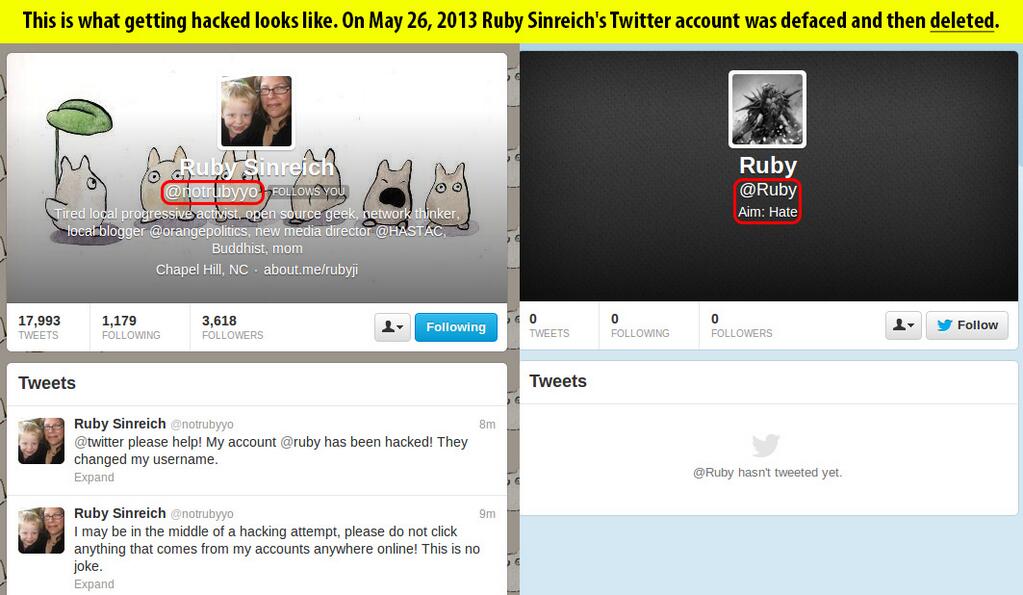
This whole thing caused some unpleasant flashbacks to The Great Hack of 2013, but my security is much better now because I use truly random, computer-generated passwords (and a password manager) and I always utilize multifactor authentication when it’s an option. So I immediately changed a few passwords that were overdue anyway, but I don’t see anything else suspicious on other accounts. Still keeping a watchful eye open…
In the chaos of the day I chalked this up to the ongoing tangle left by last week’s hacking, so today while I was at a computer I made sure to fully authorize Hootsuite using the 2-step verification that I enabled for @ruby about a week ago. It seemed to work. This evening I tried again to use Hootsuite from my phone and found that I still can’t send from any of my Twitter accounts. So I asked @hootsuite, and amazingly, they said:
@ruby We are unable to guarantee full functionality with Twitter 2-step verification at this time. ^TF
Now I know that Twitter only enabled this feature less than 2 weeks ago, but here I am – a paying customer of Hootsuite (through work) – and now that I have enabled better security on ONE of my accounts, I can no longer post tweets from ANY of my accounts from my phone.
Amazed again that huge companies that rely on their web services don’t seem to care much about the security of their accounts. They should be pushing US (customers/products) to get more secure, not the other way around!


 So